In this guide
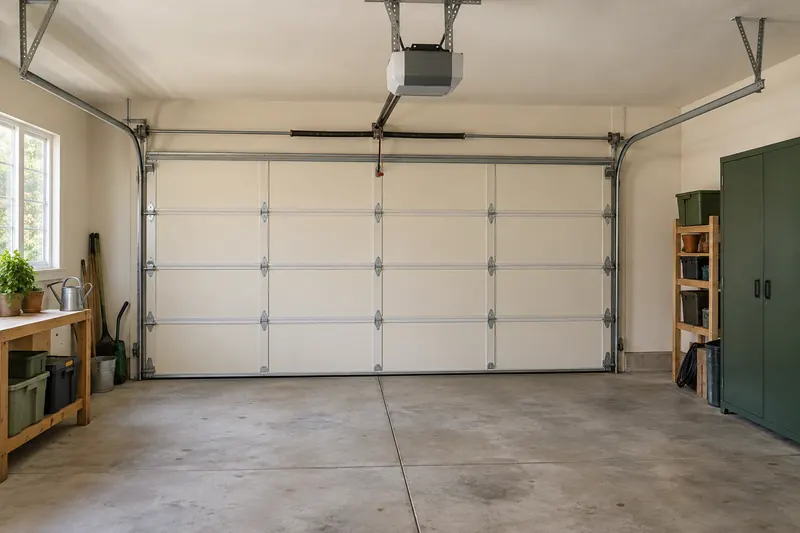
A smart garage opener includes the mechanism that moves the door. A retrofit controller adds connected commands and door-status reporting to a compatible opener you already own.
If the existing equipment works properly, investigate a retrofit before replacing it. If the door or opener needs service, resolve that first. A connected controller adds convenience; it does not repair a sticking door, worn mechanism or faulty safety equipment.
Choose the job before choosing the product
Separate your requirements into status, control and access sharing. A door-left-open notification is different from closing the door remotely. Giving a guest a temporary credential is different again.
Check whether connectivity is already built into your opener. Adding another controller may be unnecessary if its supported app already does what you need. Conversely, an opener with an app may not expose the specific features you want in Apple Home, Alexa, Google Home or another platform.
List the required actions in plain language: “Notify me if the door stays open,” “Let this person enter on Tuesday,” or “Show the door’s current position.” Use those as the basis for checking products.
Gather the information a compatibility check needs
Record the opener’s manufacturer, complete model number and manufacture date from the accessible label or existing paperwork. Note any learn-button color, the wall-control model, whether Wi-Fi is already built in, and how many separate doors you want to control.
Also record the door type and whether the opener has functioning photoelectric safety sensors. The controller’s position sensor and the opener’s safety sensors serve different purposes. Do not treat one as a replacement for the other.
A clear photograph of the model label can help manufacturer support answer accurately. If inspecting the unit requires awkward access, ask the installer to gather the information. There is no need to experiment with terminals or modify wiring to obtain a purchasing recommendation.
Use the correct manufacturer check
| System | Where to begin | What the result must confirm |
|---|---|---|
| myQ Smart Garage Control | myQ setup and compatibility tool | The existing opener is supported. myQ describes many post-1993 models with standard safety sensors, with additional conditions; age alone is not approval. |
| Genie Aladdin Connect retrofit | Genie support by kit type and compatibility guide | The specific retrofit kit and opener combination. Genie lists separate resources for single-door and three-door wired kits. |
| Meross retrofit controller | Meross compatibility guidance | The controller variant, opener model and whether an additional accessory is necessary. |



Accessories also have exclusions. The Meross RGR910 listing, for example, excludes white Security+ 3.0 learn-button openers. This is why a generic “works with Chamberlain” statement is insufficient. Do not assume a separate accessory overrides every incompatibility.
Save the relevant compatibility result with your order. If the model is absent or the documentation conflicts, get written confirmation from the controller manufacturer rather than inferring support from a similar model number.
Understand door position and safety limitations
A controller needs a reliable report of the door’s position. Some retrofit kits use a separate sensor mounted on the moving door. Genie’s door-position guidance explains that its three-door retrofit arrangement needs a sensor for each door and that a previously paired sensor can lose its connection.
An open/closed indication does not establish that the doorway is clear. Do not use a status icon as an obstruction check or bypass the opener’s safety system to enable an automation.
The Aladdin Connect installation instructions include door-type and safety-sensor restrictions and describe an audible and visual warning before app-commanded movement. Have the installer verify the applicable instructions and warning-device placement for the actual kit.
After installation, have the installer demonstrate that reported position matches the real door and complete the manufacturer’s required operational and safety checks. Keep the ordinary wall control and remotes available to the household.
Check remote access and guest permissions
Connectivity inside the garage matters as much as connectivity in the living room. Confirm coverage at the controller location and read the required Wi-Fi band and account requirements before purchase.
Ask separately whether the manufacturer app supports remote commands, which functions an outside ecosystem receives, and whether any desired feature requires a subscription. A working app connection does not prove native support in your preferred home platform.
Genie documents remote access, door notifications and scheduled virtual keys for Aladdin Connect. Those are examples of features to compare, not a promise that every garage product offers the same permissions.
Use separate guest access where supported, choose an expiry time, and verify how to revoke it. Avoid sharing the primary household password just to admit a visitor. Start with useful notifications before introducing unattended closing schedules.
Your pre-purchase checklist
- Equipment: exact opener and controller models are confirmed compatible.
- Door: its type, condition and safety equipment meet the product instructions.
- Accessories: adapters and one position sensor per door, where required, are included in the quote.
- Connection: required power and network coverage are available at the installation location.
- Controls: household members can use the normal controls as well as the app.
- Features: status, remote commands, guest access and ecosystem support are individually verified.
- Handover: the installer will demonstrate correct status, required safety checks and recovery from a disconnected sensor.
Compare the complete installed cost against an appropriately specified replacement opener. Include service that the existing mechanism needs regardless of whether you make it smart. For other ways into the home, see our smart lock guide.
Sources and scope
We checked the linked myQ, Genie and Meross documentation on September 13, 2026. This is a US-focused compatibility planning guide, not a universal compatibility list or installation procedure. Manufacturer confirmation takes precedence for your exact equipment. Read our editorial methodology.
Frequently asked questions
Do I need to replace my garage opener to make it smart?
Not necessarily. A supported retrofit controller can add connected functions to an existing opener. Check its exact model, door arrangement and safety requirements. If the equipment needs repair or already has the functions you need, address those points before adding a controller.
Is a door-position sensor the same as a garage safety sensor?
No. Position reporting tells the controller about the door’s state. The opener’s safety equipment has a separate role. A status sensor must not be used to replace, disable or bypass required safety sensors.
Does a smart garage app guarantee Apple Home or Alexa compatibility?
No. Check the exact controller variant, current platform integration and the functions it exposes. A product may offer remote operation in its own app while providing different or no controls in another ecosystem.